Newsletter
Join the Community
Subscribe to our newsletter for the latest news and updates
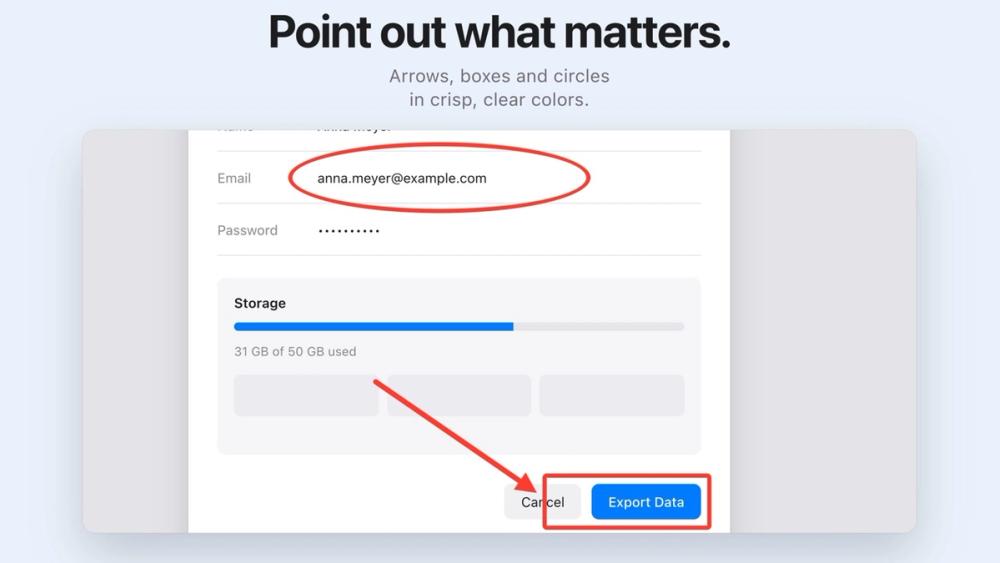
JotShot is a small Mac menu bar app for screenshot annotation. Capture an area or a window, add arrows, text, stamps or blur, then copy, drag or save it. One-time purchase, no account.
JotShot is a small menu bar app for macOS for one job: capture part of the screen, point at what matters and send it on. It is meant for anyone who explains things with screenshots, such as bug reports, support answers, design feedback or step-by-step instructions.
How it works:
You can also open, paste or drop an existing image (PNG, JPEG, TIFF, HEIC or WebP) and annotate it the same way.
Privacy: JotShot has no account, no server and no analytics, and the app does not connect to the internet. It runs in the macOS App Sandbox and only touches files you open, paste or save. It asks for the Screen Recording permission that macOS requires for screen capture and captures only when you trigger it.
Platform and price: native Mac app, written in Swift, for macOS 14 Sonoma or later on Apple Silicon and Intel; the app interface is in English. JotShot is a one-time purchase on the Mac App Store ($0.99 in the US store, 0,99 EUR in the German store; local prices vary), with no subscription, no in-app purchases and no trial; updates are included. There is no Windows, iPhone, iPad, Android or web version.
If you used Skitch, the flow will feel familiar; Evernote stopped updating Skitch in 2016, and JotShot was written from scratch for current macOS.