Newsletter
Join the Community
Subscribe to our newsletter for the latest news and updates
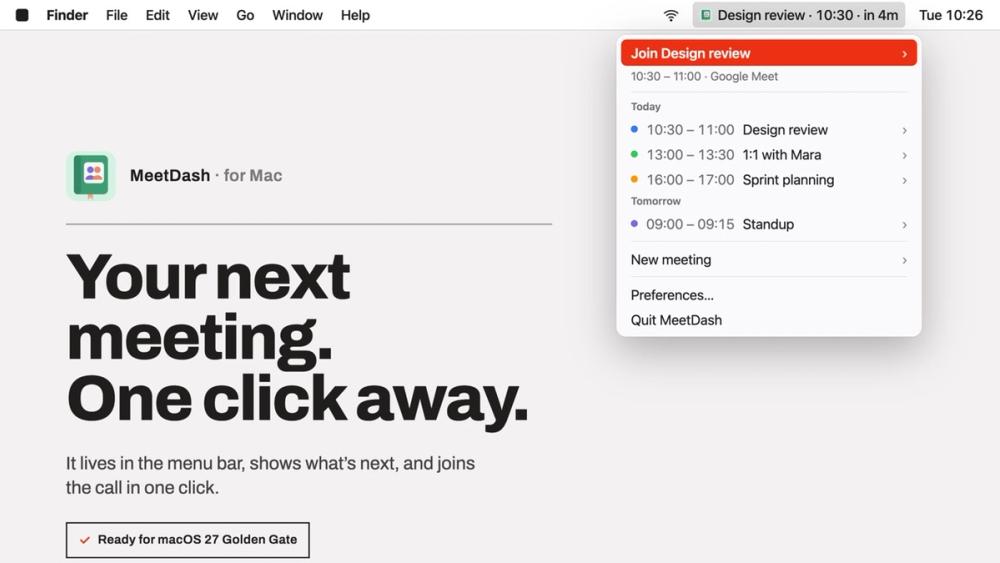
MeetDash is a Mac menu bar app that shows your next meeting and opens its Zoom, Teams, Meet or other link with one click. It reads the calendars on your Mac and never goes online. $0.99 once.
MeetDash is a small native Mac app that lives in the menu bar and keeps your next meeting in view. It shows what is next and how soon, and gets you into the call with one click. It has no main window and no dock icon.
How it works:
Reminders: a notification before every meeting with a Join button on it. The lead time is adjustable from 0 to 60 minutes (default two minutes), with an optional second reminder when the meeting starts.
Meeting links: MeetDash looks in the URL field, the location and the notes, unwraps Outlook Safe Links and prefers a known meeting service over a stray link. It recognises Google Meet, Zoom, Microsoft Teams, Webex, FaceTime, Slack Huddles, Discord, Jitsi, Whereby, GoTo Meeting, RingCentral, Skype, BlueJeans, LiveKit, StreamYard and Tuple, and opens any other web link as a plain link.
Back-to-back days: in the last ten minutes of a call, the menu bar can already show the next meeting. Filters let you choose which calendars count and hide all-day events, declined or tentative invitations, unanswered invitations and events without a link. You can also copy the link, open the event in Calendar, start a new Google Meet, Zoom or Teams call from the menu, shorten long titles and open MeetDash at login.
Privacy: no account, no server, no analytics and no tracking. The app runs in the macOS App Sandbox without network access, reads events on your Mac and never creates, edits or deletes them. When you join, your browser or meeting app connects, not MeetDash.
Platform and price: macOS 14 Sonoma or later, Apple Silicon and Intel. There is no Windows, iPhone or iPad version. $0.99 one-time purchase on the Mac App Store (0,99 EUR in Germany), with no subscription, no in-app purchases and no free trial. English interface.